Read these first
This article assumes the following earlier in its learning path.
Isolated Research Practice: How to Study an Offensive Tool Safely
Core premise: security research requires touching offensive tooling, but "can study" does not mean "may use". The boundary between them should be drawn by technical means, not self-restraint. Angle: practical method, illustrated with a real isolated deployment.
Why isolation, not "being careful"
People studying offensive tools often say "I am just looking, I will not actually attack". That self-restraint has three weaknesses:
- The tool's default behaviour is offensive. Some tools probe actively as soon as they run — you do not need to intend an attack.
- The network has no borders. If the environment can reach the internet, one misstep can touch systems that are not yours.
- Self-restraint is not auditable. Afterwards you cannot prove "I really did not hit any target".
The right approach is therefore to make crossing the line technically impossible, not merely improper.
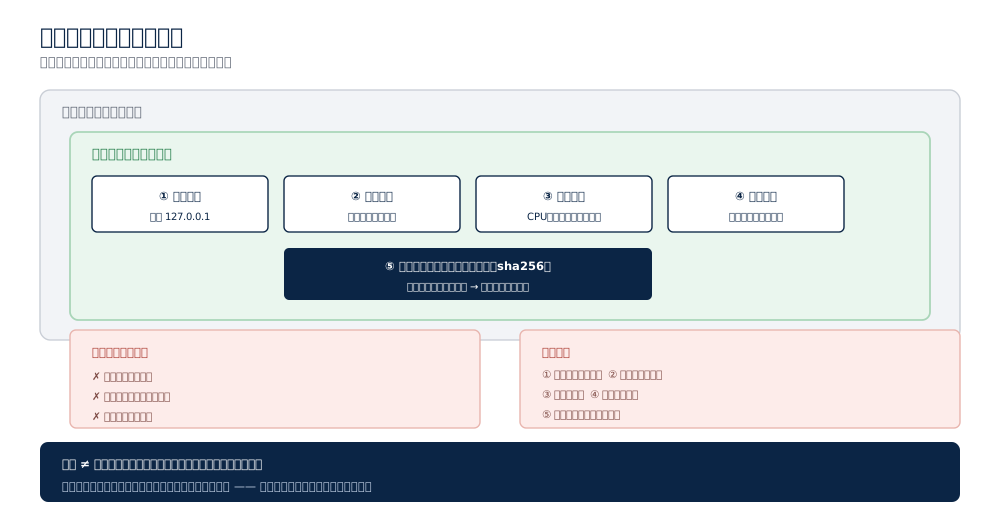
Five layers of isolation
Layer one: network isolation
The most critical layer. The research environment should:
- Bind only to the loopback address (127.0.0.1) — nothing external can connect;
- Not share the host network — the container uses its own virtual network;
- Not initiate outbound connections (unless the research requires it, and then it should be explicitly recorded).
The test is simple: try to connect from another machine — it should be impossible.
Layer two: port control
Even bound to loopback, mind the details:
- Service ports should not be exposed on the LAN;
- Database ports should not be published to the host (visible only inside the container);
- When a service must be reachable, record exactly which ports are open and why.
Layer three: resource limits
A research environment should have explicit CPU / memory / disk ceilings, for two reasons:
- Containment: some tools scan heavily or generate large traffic; limits act as a brake;
- Protection: prevent the research environment from starving other services on the machine.
Layer four: data boundaries
- The research environment's data directory is separate, never mixed with work data;
- Sensitive configuration (keys, passwords) has tight permissions (e.g. 600);
- On completion, the environment should be disposable as a whole — the cleanest way to finish.
Layer five: tool verification
Any downloaded tool should have its fingerprint checked (hash value), for two reasons:
- Supply-chain defence: confirm you received the official build, not a substituted one;
- Reproducibility: recording version and fingerprint lets you rebuild the same environment later.
In practice, mature tool manifests pin fingerprints in a configuration file and compare automatically at install time. If no matching fingerprint can be found, leave it blank rather than invent one.
A real isolated deployment, in plain terms
Here is roughly how one was done:
- Build a separate room: use container technology to create an environment on the local machine, fully separated from daily systems;
- Lock the door: all services bind only to loopback — zero external exposure;
- Private plumbing: the database is visible only inside the container, with no published port;
- Check doors and windows: after start-up, run an environment health check covering connectivity, directory permissions, and tool completeness;
- Lock the toolbox: place all research tools in a dedicated directory — placed, not executed;
- Verify fingerprints one by one: compare each tool against its official hash to confirm it was not substituted;
- Apply the seal: the environment serves only static reading and environment verification, never execution against a real target.
Most important: at no point was any offensive tool executed. Tools sat in the toolbox; services stayed bound to the local machine.
Five red lines
- Never run offensive tools against a real target — including your own organisation's systems, absent explicit written authorisation;
- Never probe third-party systems — scanning is itself an attack;
- Never expose the research environment externally — accept inconvenience rather than leave an open port;
- Never connect the research environment to production networks — one environment, one purpose;
- Never use the tooling outside authorised scenarios — legality follows the scenario, not the tool.
Common misconceptions
"I only downloaded it, that is not use." Downloading is usually harmless; what follows — how it is deployed — determines the risk. Putting a tool into an externally reachable environment is the risk.
"A firewall makes it safe." Firewalls govern what comes in; the risk of a research environment is usually what goes out.
"Local means safe." Local means "not exposed to the internet", not "not connected to the internal network". Loopback binding is the real isolation.
Advice for organisations
If your team needs to study such tooling:
- Provide a dedicated isolated environment, not the researcher's daily machine;
- Define an explicit authorisation process: what may be done, under what conditions;
- Keep complete records: what was installed, what ran, whether any outbound connection occurred;
- Dispose of the environment afterwards, rather than leaving it unattended.
Next steps
- For the architecture of such tooling, read double-graph architecture and multi-agent coordination
- For a systematic defensive review, read defense lessons from the red-team postmortem
- For the conceptual layer (credentials and authentication), read credentials and AD concepts
Next on this path
More in Evidence
- Tunnel Techniques Explained: When an AI Agent Needs to Pave a Road into the Internal Network
- Agentic Attack Tooling Research Series: A Guide to All Twelve Parts
- When AI Learns to Pentest: The ARTEX Case and the Rise of Agentic Attack Tooling
- Cloud Identity and Permissions: Where the New Access Cards Live