How Databases Work: From File Cabinets to Vector Search
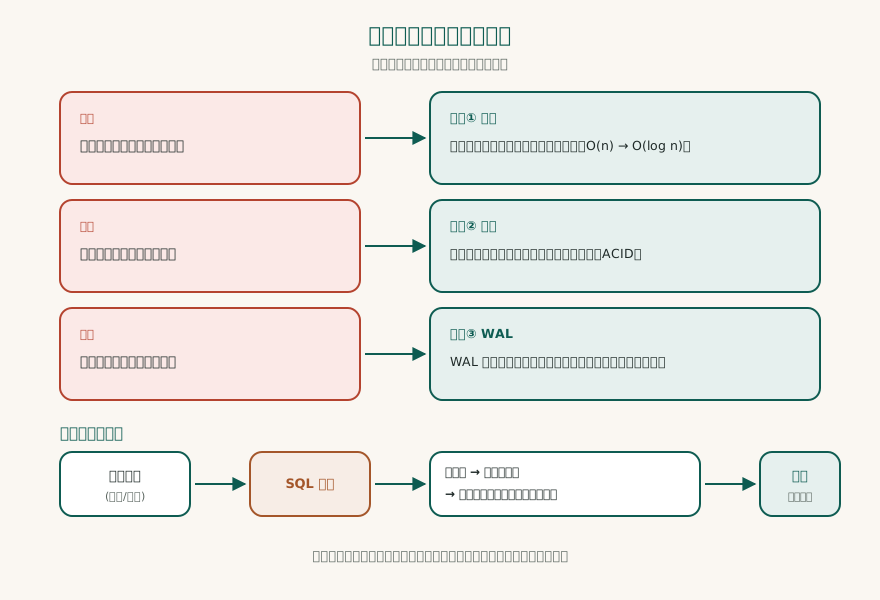
Imagine you just opened a coffee shop. On the first day, you wrote every order in a notebook: date, item, amount. Business was good. A month later, you open the notebook and want to find "how many lattes were sold last month," but you have to flip page by page and add them up with a calculator. This is the first problem you encounter: how long it takes to find one record.
So you switch to Excel. You open a spreadsheet, use the filter function to find "latte," and use the SUM function to add up the amount, done in seconds. But one day you and your partner are editing this Excel file at the same time. He just added a new order, and after you save, his changes are gone. This is the second problem: what do you do when two people edit at the same time?
Worse still, one afternoon the power goes out. Excel does not have time to save, and half a day's orders are all lost. This is the third problem: what do you do when the power goes out?
These three problems are the core problems that databases are designed to solve.
Why Databases Are Needed
Notebooks, Excel, and databases: the evolution of these three is not because you became more capable, but because the amount of data and the usage scenarios became more complex.
Notebooks are suitable for very small, linear records. Their problem is that they have no structure, so to find data you can only flip from beginning to end.
Excel is suitable for structured data for individuals or small teams. It has columns, formulas, and filters, but it is essentially a file. When the file exceeds tens of thousands of rows, opening it becomes slow; when two people edit it at the same time, conflicts easily occur; when the computer crashes, unsaved content disappears.
Databases are systems designed specifically for the three requirements of "large amounts of data, simultaneous access by multiple people, and no loss." They solve the three problems above:
- Fast lookup: Through index structures, finding one record among hundreds of millions of records takes only a few milliseconds.
- Concurrency control: Multiple users can read and write the same data at the same time without overwriting each other.
- Crash recovery: Even if there is a sudden power outage, after a restart the data can be restored to a consistent state.
From today on, the first concept you need to remember: a database is not a "more powerful Excel," but a system designed specifically for "large amounts, multiple people, and no loss."
How Databases Store Data
You might imagine a database keeps data somewhere mysterious, but in truth it just writes data into files on disk. The difference is that it does not write randomly; it writes in an organized way.
Imagine a giant filing cabinet. The cabinet has many drawers, each drawer holds many folders, and each folder holds many sheets of paper. A database is structured the same way:
- Database: the whole cabinet.
- Table: one drawer, such as a customers table or an orders table.
- Row: one sheet of paper, representing a single record, such as one customer's data.
- Column: a field on the paper, such as name, phone, or address.
Inside the database there is one more, finer layer: the page.
The storage engine cuts data into fixed-size blocks, usually 4KB, 8KB, or 16KB, called pages. A page is the smallest unit of database reads and writes. When you query one record, the database does not read just that record; it reads the entire page containing it into memory. Like pulling materials from a filing cabinet: you do not extract a single sheet, you take out the whole folder and then find the page you need.
Why design it this way? Because of how disk I/O behaves: reading one contiguous block is far cheaper than reading many scattered blocks. Keeping related data together cuts the disk's seek time.
Remember the second key idea: the storage unit of a database is the page, and one page holds many records. Every read and write happens in page units.
Indexing Principles: From Flipping Through a Book to Looking Up a Table of Contents
Now you have a "customer table" with one million records. You want to find Chen Dawen's phone number. Without an index, the database can only start from the first record and compare them one by one until it finds Chen Dawen. This is like getting a million-page phone book and needing to find "Chen Dawen": you can only start flipping from the first page. On average, you have to flip through five hundred thousand pages, which is O(n) time complexity.
But in reality, you would not flip through a phone book this way. You would first turn to the table of contents, find the page range for "Chen", and then turn to that page. This is the principle of an index.
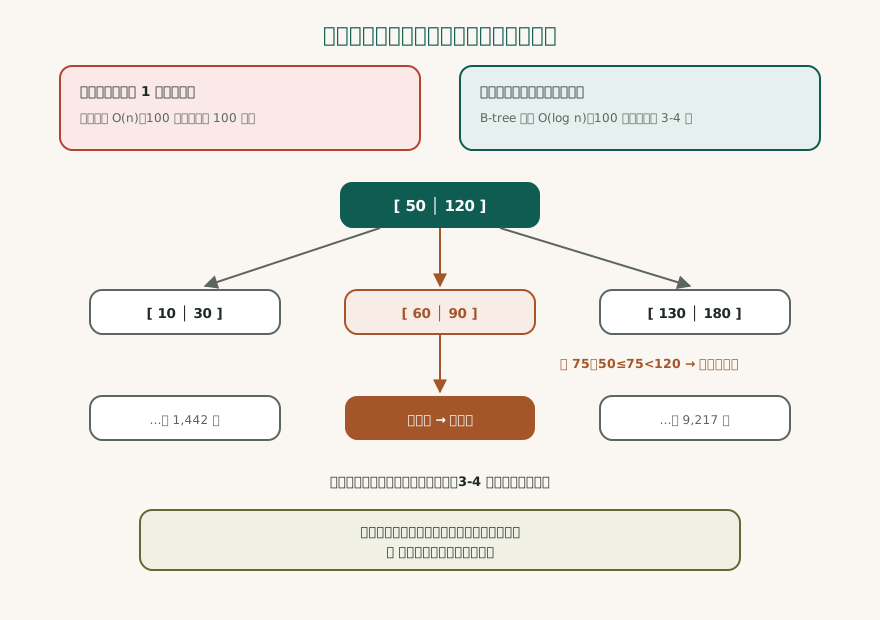
The most commonly used index structure in databases is the B-tree (balanced tree). It looks like an upside-down tree:
- Root node: The topmost level of the tree, and there is only one. For example, "Data from A to M is on the left, and data from N to Z is on the right."
- Branch node: The middle level, which continues to divide the data. For example, "A to F is on the left, and G to M is on the right."
- Leaf node: The bottom level, which stores pointers to the actual data (pointing to the locations of data pages).
When you query "Chen Dawen", the database starts at the root node: "Chen" is between N and Z, so it goes right; at the branch node, "Chen" is between C and H, so it goes left; then to the next branch, and finally to the leaf node, where it finds the pointer for the row "Chen Dawen". The entire process only needs to traverse 3 to 4 levels.
This is why B-trees can reduce query time from O(n) to O(log n). For one million records, flipping through a book takes an average of five hundred thousand times, while a B-tree needs only 3 to 4 times. For one billion records, it also needs only 4 to 5 times. This is the power of indexes.
But indexes are not free. Every time you add a record, the database not only has to write the data to a data page, but also update the index structure. Therefore, the more indexes there are, the slower writes become. In addition, the index itself also takes up hard disk space. This is why database administrators need to plan carefully: which columns need indexes and which do not.
Remember the third concept: an index is a trade-off that exchanges space and write speed for read speed.
Transactions and ACID: A Bank Transfer Example
Now let's look at one of the most elegant designs in databases: transactions.
Imagine you are making a bank transfer. You transfer 100 yuan from account A to account B. This operation consists of two steps:
- Subtract 100 from the balance of account A.
- Add 100 to the balance of account B.
If the system crashes after the first step is completed and the second step is not executed, what happens? Your 100 yuan disappear into thin air. This is unacceptable in a financial system.
Databases use "transactions" to solve this problem. A transaction is a set of operations that either all succeed or all fail. This is Atomicity in the ACID principles.
ACID is an acronym for four properties:
Atomicity: Every step in a transaction either completes entirely or does not happen at all. In the transfer example, if A is debited successfully but B fails to be credited, the entire transaction will roll back, and A's debit will also be undone.
Consistency: Before and after a transaction executes, the data must comply with all rules. For example, if a bank specifies that an account balance cannot be negative, and a transfer would cause A to become negative, the transaction will be rejected.
Isolation: When multiple transactions execute at the same time, they do not interfere with each other. If you and a partner are modifying the orders table at the same time, the database will ensure that your changes do not conflict. The specific implementation is through "locks" or "multiversion concurrency control", which we will not go into here.
Durability: Once a transaction is successfully committed, the data will not be lost even if the system crashes.
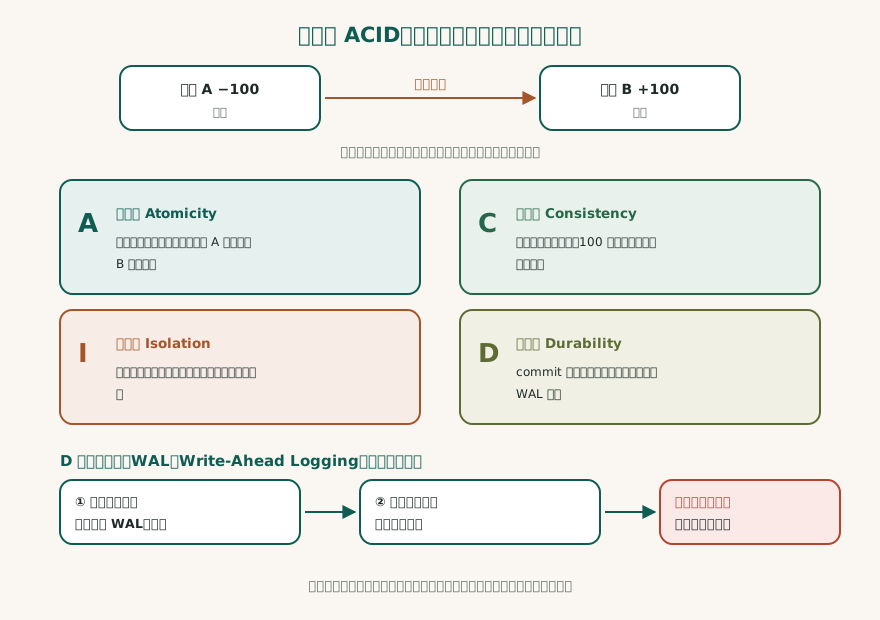
So how do databases achieve durability?
Database Family Map
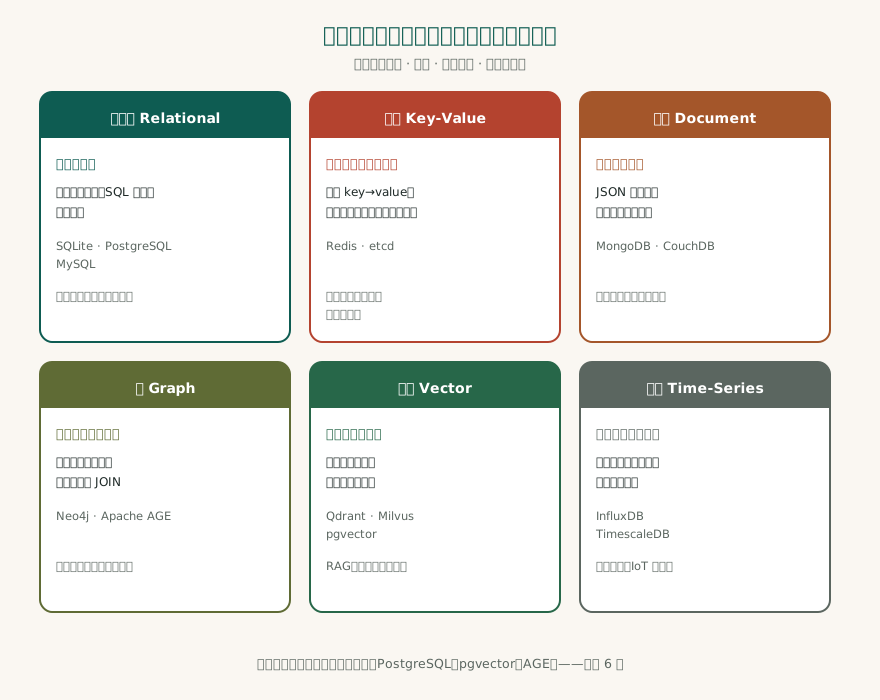
Now that you understand the core principles of databases, let's look at what types of databases exist. Each database has its own strengths, just like transportation: cars are suited to roads, boats to water, and planes to long distances. There is no "best" database, only the "most suitable" database.
Relational Database: Tables + SQL + Transactions
Principle: Data is stored in tables, and each table has fixed columns. Tables can be related through "foreign keys". The query language is SQL (Structured Query Language).
Everyday analogy: Like multiple worksheets in Excel, but stricter and more powerful.
Representative products: SQLite (single-file embedded), PostgreSQL (most feature-complete), MySQL (most common for web applications).
Use cases: Scenarios requiring transactions, complex queries, and fixed data structures. For example, financial systems, ERP, and content management systems.
Key-Value Database: Dictionary Analogy
Principle: Data is stored as "key-value" pairs. You provide a key (key), and the database returns the corresponding value (value).
Everyday analogy: Like a dictionary: you look up "apple" and get the definition of "apple". But a dictionary only allows lookup by key, not reverse lookup of a key by its definition.
Representative products: Redis (most popular, supports multiple data structures).
Use cases: Caching, session management, counters. Scenarios requiring extremely fast reads and writes but simple query patterns.
Document Database: JSON Stored as a Whole
Principle: Data is stored as documents (usually in JSON format). Each document can have a different structure.
Everyday analogy: Like a folder that can contain documents in different formats, some three pages, some ten, some with a table of contents, some without.
Representative products: MongoDB (most popular).
Use cases: Scenarios with flexible data structures and rapid iteration. For example, content management, user profiles, and logging systems.
Graph Database: Nodes + Edges
Principle: Data is stored as "nodes" and "edges". Nodes represent entities (people, companies), and edges represent relationships (friends, employment).
Everyday analogy: Like a social network. You are a node, your friends are nodes, and the friendships between you are edges. Finding "friends of friends" is a native operation in a graph database.
Representative products: Neo4j (most popular), Apache AGE (open-source solution based on PostgreSQL).
Use cases: Scenarios requiring multi-hop queries. For example, social network analysis, supply chain tracking, and knowledge graphs.
Vector Database: A New Species of Semantic Search
Principle: Data is stored as vectors (a string of numbers). Vectors represent semantics; for data with similar semantics, the vectors are also close in distance in space.
Everyday analogy: Imagine a three-dimensional space: the vector for "cat" is near "dog" but far from "car". You input "kitten", and the database finds the nearest vector and returns "cat" or "dog".
Representative products: Qdrant, Milvus, pgvector (PostgreSQL extension).
Use cases: Semantic search, recommendation systems, RAG (Retrieval-Augmented Generation). This is a core component of the AI era.
Time-Series Database: Optimized for Timestamps
Principle: Specifically optimized for time-series data. Data is sorted by timestamp, and queries are usually "data from the past hour" or "trends over the past day".
Everyday analogy: Like stock quotes, with new prices every second, and what you care about is the trend and comparison with history.
Representative products: InfluxDB, TimescaleDB.
Use cases: Monitoring systems, IoT, financial market data.
Remember the fifth concept: there is no best database, only the database that best fits the scenario.
A Deep Dive into Vector Databases: A New Species in the AI Era
Vector databases have been the hottest type of database since 2023, because they are a core component of AI applications. Here, we will take a deep dive into their principles.
Embedding: Turning Text into Numbers
First, what is embedding? Simply put, it turns a piece of text (a word, a sentence, a document) into a string of numbers. This string of numbers represents the "semantics" of the text.
For example, the word "cat" may become [0.12, -0.34, 0.56, ...] after being converted by a certain model, 1024 numbers in total (called a 1024-dimensional vector). The vector for "dog" may be very close to that of "cat" because they are both animals. The vector for "car" is far away from them.
Common embedding models include OpenAI's text-embedding-3, the open source bge-m3, etc. bge-m3 produces 1024-dimensional vectors and supports multiple languages.
Similarity Calculation
With vectors, how do we determine whether two pieces of text are similar? The most common method is to calculate cosine similarity.
The smaller the angle between two vectors, the closer the cosine value is to 1, indicating greater similarity. When the angle is 90 degrees, the cosine value is 0, indicating no relation at all. When the angle is 180 degrees, the cosine value is -1, indicating complete opposition.
Why Full Comparison Is Too Slow
Suppose you have one million documents, each converted into a vector. Now you enter a query and need to find the 10 most similar ones. The simplest method is: calculate similarity between the query vector and all one million vectors, then sort and take the top 10. This is "brute force search" or "exact search."
For one million records, calculating once per record requires one million calculations. What if there are one hundred million records? One hundred million calculations. That is too slow.
ANN: Approximate Nearest Neighbor Search
To solve this problem, scientists invented approximate nearest neighbor search (Approximate Nearest Neighbor, ANN). Its core idea is: sacrifice a little accuracy in exchange for a large speed improvement.
ANN has many algorithms; here we introduce the two most popular:
HNSW (Hierarchical Navigable Small World): This is a multi-layer graph structure. The bottom layer contains all vectors, and each layer is a subset of the bottom layer. During a query, you start from the top layer, find the nearest node, then move down layer by layer, gradually approaching the target. It is like taking a plane from Taipei to Kaohsiung: first fly to a high altitude (high layers), then gradually descend (lower layers), and finally land.
HNSW's advantages are fast queries and high recall; its disadvantages are slow index construction and high memory usage.
IVF (Inverted File Index): First, cluster all vectors (using the K-means algorithm). During a query, only search the cluster containing the query vector and adjacent clusters. It is like looking for a friend in a certain city: first determine which district he is in, then search in that district.
IVF's advantages are fast construction and low space usage; its disadvantage is lower recall than HNSW.
The Cost: Approximation May Miss
At the core of ANN is "approximation," which means it may miss the truly nearest neighbor. For example, if you search for "cat," exact search will return "cat," "dog," and "mouse," but ANN may return only "cat" and "dog," missing "mouse."
This is a trade-off between speed and accuracy. In most AI applications, this trade-off is acceptable because users usually care only about the top few results.
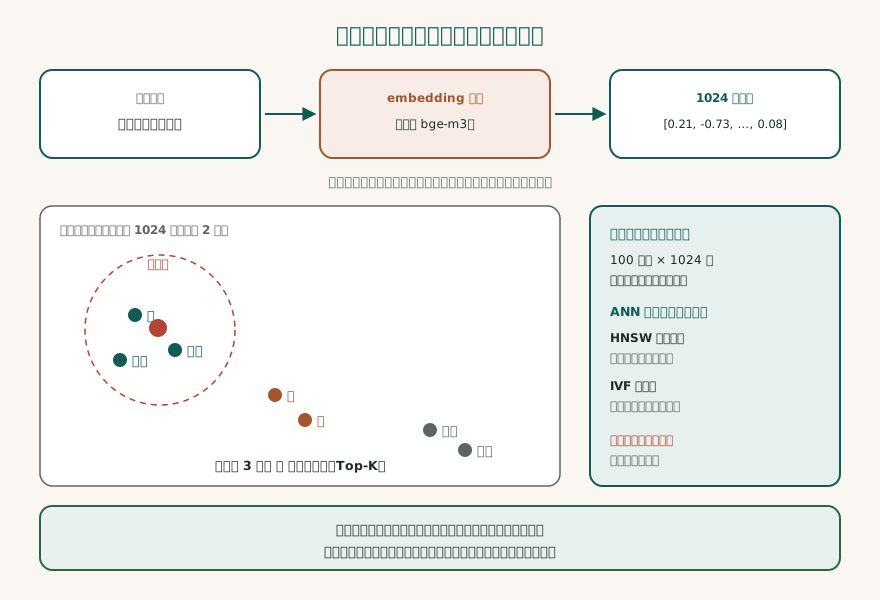
Remember the sixth concept: vector search uses "approximation" to gain speed, and accuracy will be slightly reduced.
Hybrid Databases: The Mainstream Direction from 2024 to 2026
After vector databases went viral in 2023, the trend from 2024 to 2026 is "hybrid databases": integrating vector search capabilities into traditional databases, without needing to deploy a separate dedicated vector database.
pgvector 0.8: Adding Vector Columns to PostgreSQL
pgvector is an extension for PostgreSQL that lets PostgreSQL store vectors, create vector indexes, and perform vector search. Version 0.8, released in 2024, added HNSW indexes and iterative scan.
Advantages: Vectors can be stored in the same table as relational data and queried with the same SQL statement. For example, "find documents most semantically similar to the query, where the author must be Zhang San, and the publication date is after 2025." This kind of "vector search + relational filtering" query requires two steps in a dedicated vector database (first vector search, then relational filtering), but in pgvector it requires only one SQL statement.
In addition, vector data can be backed up, restored, and participate in transactions together with other data. This greatly simplifies operations.
sqlite-vec: Single-File Embedded
sqlite-vec is an extension for SQLite that lets SQLite store vectors and perform brute-force KNN (K nearest neighbor) search.
Advantages: The entire database is a single file, with zero service and zero operations. It is suitable for single-process applications, desktop applications, and mobile applications.
Limitations: Currently it only supports brute-force KNN, with no ANN index. When the number of vectors exceeds 100,000, search speed drops noticeably. It is suitable for small-scale scenarios (≤100,000 vectors).
Apache AGE: Running Graph Queries in Postgres
Apache AGE is an extension for PostgreSQL that lets PostgreSQL execute the Cypher query language (Neo4j's query language). This means you can use both SQL and Cypher in PostgreSQL to handle relational data and graph data.
Advantages: No need to deploy Neo4j separately; you can do graph queries with PostgreSQL. Graph data can be queried and transacted together with relational data.
One Engine = SQL + Vector + Graph + Full Text
The ultimate form of a hybrid database is: one engine that simultaneously supports SQL (relational queries), vector search (KNN), graph queries (multi-hop traversal), and full-text search. PostgreSQL plus pgvector, Apache AGE, and tsvector (built-in full-text search) can achieve this effect.
Advantages: One engine, one backup, one transaction. Simple operations and high data consistency.
Cost: A resident PostgreSQL server is required. In comparison, SQLite is zero-service (directly reads and writes files).

Remember the seventh concept: hybrid databases are the trend, but choose based on the scenario. Not all scenarios need hybrid.
Selection Comparison Table and Decision Tree
Finally, here is a practical selection guide.
Embedded vs Server
This is the first dividing line:
- Embedded database (SQLite): The database is embedded into the application as a library, directly reading and writing files. Suitable for single-process applications, desktop applications, mobile applications, and small websites.
- Server database (PostgreSQL, MySQL, Redis): The database is an independent service, and applications access it through a network connection. Suitable for concurrent writes from multiple clients, large websites, and enterprise applications.
Dividing line: whether multiple processes or servers need to write data at the same time. If yes, use a server database; if only one process writes, an embedded database is enough.
When SQLite Is Enough
- Single-process applications (desktop software, CLI tools, mobile App)
- Small websites (fewer than 100,000 daily visits)
- Prototyping, rapid validation
- Data volume below tens of GB
SQLite's advantages are zero configuration, zero ops, and single-file portability. Many times, SQLite is enough.
When to Use Postgres
- Concurrent writes from multiple clients
- Need complex queries (multi-table JOINs, subqueries, window functions)
- Need strict transaction support
- Data volume greater than tens of GB
- Need vector search (using pgvector)
- Need graph queries (using Apache AGE)
- Need full-text search
PostgreSQL is the most feature-complete open-source relational database, and it can handle almost every scenario.
When You Need a Dedicated Vector Database
- Vector count greater than the million scale
- Need extreme search performance (millisecond-level response)
- Do not need complex relational queries
- The team has the capability to operate and maintain a dedicated vector database
Dedicated vector databases (Qdrant, Milvus) have the advantages of extreme performance and rich features (support for multiple ANN algorithms, filtering, and pagination), and the disadvantage of requiring additional operations and maintenance.
Decision Tree
-
Is it a single-process application?
- Yes → SQLite
- No → Next step
-
Do you need vector search?
- No → PostgreSQL or MySQL
- Yes → Next step
-
Is the vector count greater than the million scale?
- No → PostgreSQL + pgvector
- Yes → Next step
-
Do you need complex relational queries or transactions?
- Yes → PostgreSQL + pgvector
- No → Dedicated vector database (Qdrant, Milvus)
Remember the eighth concept: In technology selection, look at the scenario first, not popularity. If SQLite is enough, do not move to Postgres; if Postgres is enough, do not move to a dedicated vector database.
Next Steps
Congratulations on making it this far. You now understand the core principles of databases, their family classifications, the mechanics of vector search, and the decision logic for selection. This knowledge will help you make the right database choices in real projects.
Next, you can continue reading:
- Search Engine Comparison: Learn the differences between traditional search engines and vector search, and why modern search systems often combine both.
- RAG Deep Dive: RAG (Retrieval-Augmented Generation) is a core architecture of the AI era, and vector databases are a key component within it. Learn how RAG works.
- Transformer Architecture Explained: Learn the technical principles behind embedding models and why text can be turned into vectors.
- Memory Hub Architecture Design: A practical vector database application case, learn how to design a long-term memory system for AI assistants.
- What Are APIs and SDKs: If you are interested in "how applications interact with databases," this is an introductory guide.
The world of databases is vast, and this article is only the starting point. But with these foundations, you can explore each area more deeply. Happy learning.
More in Learn
- Agent Interfaces: choosing between CLI, API, browser use, computer use, and sandboxes
- Build Your First AI Agent in Seven Steps: from environment to a minimal production pass
- After You Press Enter: From 0.03 s to 0.85 s, What Your Question Goes Through
- The AI Coding Tools Map: Recognize the Form Factor First, Memorize Names Later