What Is LangGraph: From Linear Chains to State-Machine Agents
The Bottom Line First
What LangGraph does is rewrite an Agent's workflow from a "straight line" into a "subway map with branches."
Here is an analogy. A traditional Chain is like a one-way conveyor belt: raw materials enter at one end, finished products come out the other, and in between it neither goes back nor suddenly switches lines. This is very useful when the workflow is simple.
But real-world workflows are rarely so well-behaved. You will quickly encounter these three situations:
- Some questions require a detour to look up data, while others do not
- If the lookup fails, you need to go back and retry
- Halfway through, you need to stop and wait for human approval
A conveyor belt cannot do these things. What you need is a subway map: it has transfer stations, loop lines, and can also stop at a certain station to wait for someone.
LangGraph is the toolset that helps you draw the "conveyor belt" as a "subway map." You define three things: state (what is carried on the train), nodes (what each station does), and edges (under what conditions it travels to the next station).
1. Start with a Real Pain Point
Suppose you are building a customer service Q&A bot. After it goes live, it will encounter four types of input in daily use:
| User input | Ideal handling |
|---|---|
| "What is the return policy?" | Look up the knowledge base, then answer directly |
| "I want to change the delivery address" | Check the order system, but verify identity first |
| "Your service is terrible" | Escalate to a human; do not force an answer |
| "Explain the previous question again" | Reuse the previous context; do not start from the beginning |
If you lay out these four sentences, you will notice one thing: they share the same set of tools (knowledge base, order system, human customer service), but they are not the same workflow.
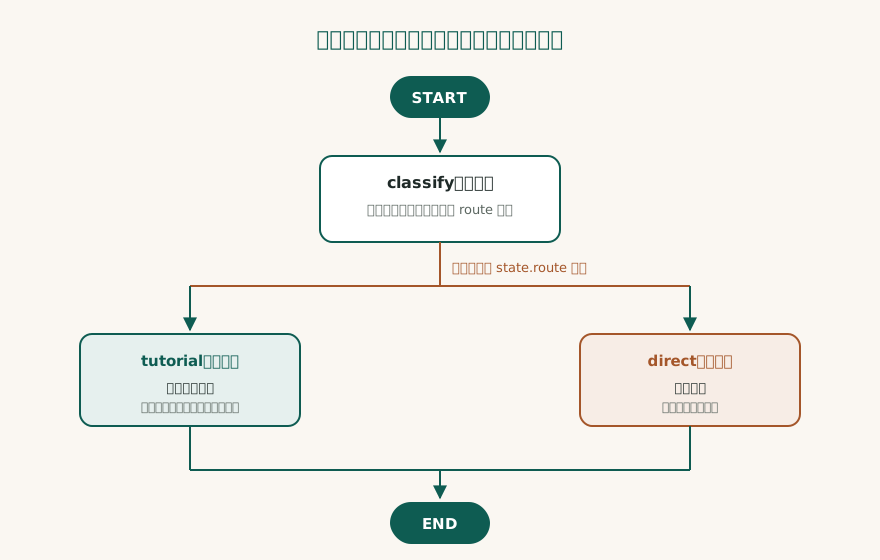
What really determines the direction is the decision in the middle: which path should this sentence take?
This is where Chain gets into trouble. It assumes you know the order in advance and can just write it out sequentially. But the question of "which path to take" often can only be known after reading the content.
This is like the ordering process at a restaurant. If every customer orders the same set meal, one conveyor belt is enough. But in reality, some people want extra spice, some do not eat beef, and some only want soup. You need someone standing nearby looking at the menu and deciding which kitchen to send the order to.
That action of "deciding where to send it" is what LangGraph helps you make explicit.
II. Three Things Chain Cannot Handle
To be clear first: this is not to say Chain is bad. It is that when requirements grow into the following three shapes, Chain starts to struggle.
1. Branching
“If the problem belongs to category A, do X; otherwise, do Y.”
Of course, you can force if/else into a Chain. One or two conditions are fine, but when the conditions become eight and are nested within each other, the whole chain turns into a tangled pile of conditionals that nobody dares to modify. What is more troublesome: these judgments are hidden deep in the code, and you cannot see the full picture.
2. Loops
“The retrieved data is not enough; switch to another keyword and query again.”
This is the most common behavior for an Agent. But Chain has no native concept of “going back to the previous step.” You have to wrap a while loop yourself, and then handle the count for “how many retries before giving up” yourself.
3. Interruption and Recovery
“This refund amount is relatively large; send it for manual approval first and continue tomorrow.”
This one is the most realistic, and also the most fatal. It is completely invisible during the prototype stage, but after launch, the first requirement that “needs human intervention” will break it. Because once a Chain is interrupted, that half-finished state has nowhere to be stored, and the whole chain can only be rerun from the beginning.
By analogy: Chain is like a piece of paper filled with steps. You get to step three, are called into a meeting, and when you come back, you find that the paper has been blown away by the wind, so you can only start over from step one.
LangGraph’s approach is: make a note on a shared whiteboard at every step. Interrupted? The whiteboard is still there, so you can come back and pick up where you left off.
3. Three Concepts, Explained Through a Kitchen
LangGraph's documentation is full of terms like State, Node, and Edge. But they all correspond to very everyday things.
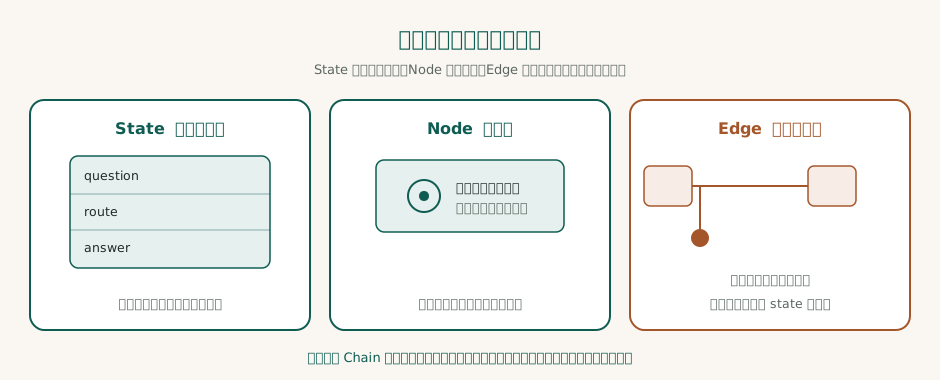
| Concept | Kitchen Equivalent | The Question You Need to Answer |
|---|---|---|
| State | Shared whiteboard | What data needs to be passed between steps? |
| Node | Workstation | What does this step actually do? |
| Edge | Sign at the intersection | Under what conditions does it take which path? |
Three things are worth calling out in particular, because they are where beginners are most likely to get confused.
First, nodes do not pass data directly between each other. Nodes do not call other nodes; they all interact only with the whiteboard. The benefit is that any step can be replaced or tested independently, without affecting everything else.
Second, a node returns an "increment", not the entire state. You do not need to copy everything on the whiteboard and then modify it; you only return the cell you changed. LangGraph handles the merging.
Third, the result of a decision should itself be recorded on the whiteboard. For example, record "decided to take the teaching route" in the route field. That way, afterward you can look up "why this path was taken in the first place", which is extremely helpful for debugging and observability.
IV. Breaking Down That Code
The code below is a complete, copy-and-run version that has been tested with Python 3.9.6 + langgraph 0.6.11 (langchain-core 0.3.86).
It deliberately does not call any LLM. The reason is simple: if you bring a model in from the start, you will not be able to tell which parts are the graph's mechanics and which are the model's contribution. With pure function nodes, the mechanism can be isolated and examined on its own.
First, a diagram to explain the structure of this code:
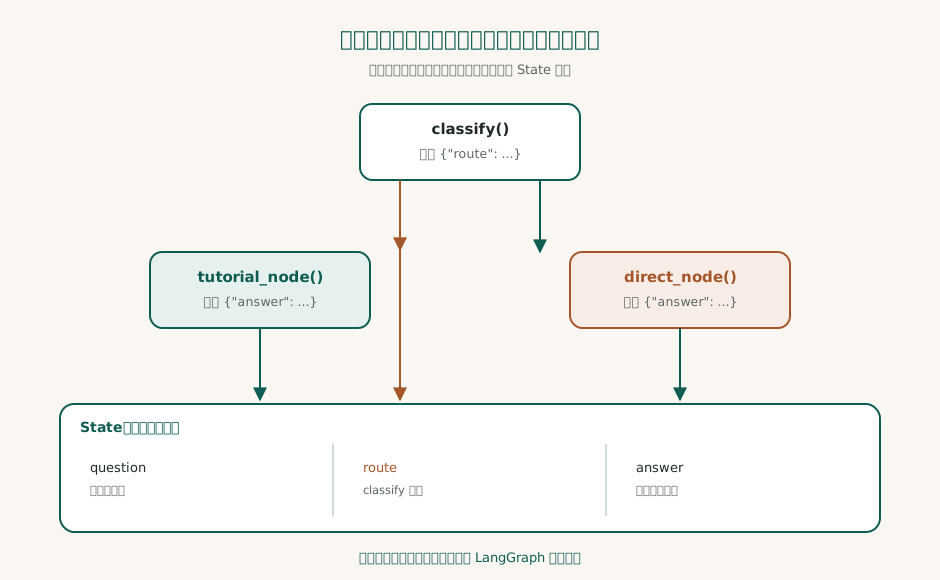
Once you understand this diagram, the code is just a matter of syntax.
from typing import Literal, TypedDict

from langgraph.graph import END, START, StateGraph


class State(TypedDict):
    question: str
    route: str
    answer: str


def classify(state: State) -> dict:
    """Routing: simple rule for demonstration, in practice just replace this with LLM classification"""
    return {"route": "tutorial" if "How" in state["question"] else "direct"}


def pick(state: State) -> Literal["tutorial", "direct"]:
    """Conditional edge decision function: returns the name of the next node"""
    return state["route"]


def tutorial_node(state: State) -> dict:
    return {"answer": f"[Tutorial Path] Produce step-by-step instructions for '{state['question']}'"}


def direct_node(state: State) -> dict:
    return {"answer": f"[Direct Path] Produce a short answer for '{state['question']}'"}


g = StateGraph(State)
g.add_node("classify", classify)
g.add_node("tutorial", tutorial_node)
g.add_node("direct", direct_node)
g.add_edge(START, "classify")
g.add_conditional_edges("classify", pick, {"tutorial": "tutorial", "direct": "direct"})
g.add_edge("tutorial", END)
g.add_edge("direct", END)

app = g.compile()
for q in ["How to use LangGraph?", "What is LangGraph?"]:
    out = app.invoke({"question": q})
    print(f"{q} → Route {out['route']}|{out['answer']}")
The entire code can be divided into four blocks. It is not difficult if you look at them one block at a time:
First block: Define what to put on the whiteboard.
class State(TypedDict):
    question: str
    route: str
    answer: str
It holds only three cells. question is there from the start, route is written during routing, and answer is the final output.
Block two: define the three workstations.
classify reads the question and picks a route; tutorial_node and direct_node each produce a different kind of answer. Notice that every function returns only a dict — in other words, "which cell on the whiteboard I want to change."
Block three: wire the edges.
g.add_edge(START, "classify")
g.add_conditional_edges("classify", pick, {"tutorial": "tutorial", "direct": "direct"})
g.add_edge("tutorial", END)
g.add_edge("direct", END)
There are two kinds of edges here, and it is worth distinguishing them clearly:
add_edgeis a normal edge: after A finishes, it will definitely go to B, with no ambiguity.add_conditional_edgesis a conditional edge: it binds to a decision function (in this example,pick), and that function reads the whiteboard and returns the name of the next node.
In other words, a conditional edge is the director at the intersection. And the director's basis is not guesswork; it is the route field on the whiteboard.
Fourth block: run it.
app = g.compile()
out = app.invoke({"question": "How do I use LangGraph?"})
compile() compiles the graph into an executable object, and invoke() feeds in the initial state, runs it to completion, and returns the final state.
The actual output is as follows (same piece of code, same app, the only difference is whether the input sentence contains the two-character term meaning "how"):
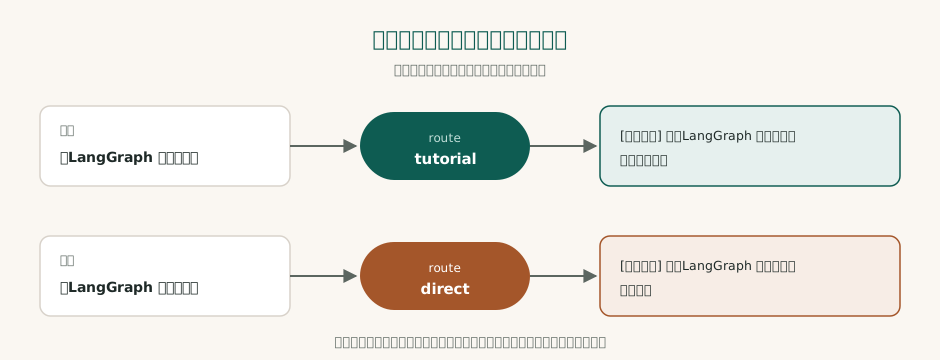
How to use LangGraph? → route tutorial|[tutorial path] produces step-by-step instructions for "How to use LangGraph?"
What is LangGraph? → route direct|[direct path] produces a brief answer for "What is LangGraph?"
At this point, you have finished reading the core of LangGraph. What remains are engineering details.
5. Checkpoints: Like Game Saves, and One Save Slot per Person
As mentioned earlier, the thing Chain fears most is interruption. LangGraph's solution is called a checkpoint.
The game analogy is the most fitting: a checkpoint is a save point. You do not need to start from the first level every time you restart; just return to the previous save point and continue.
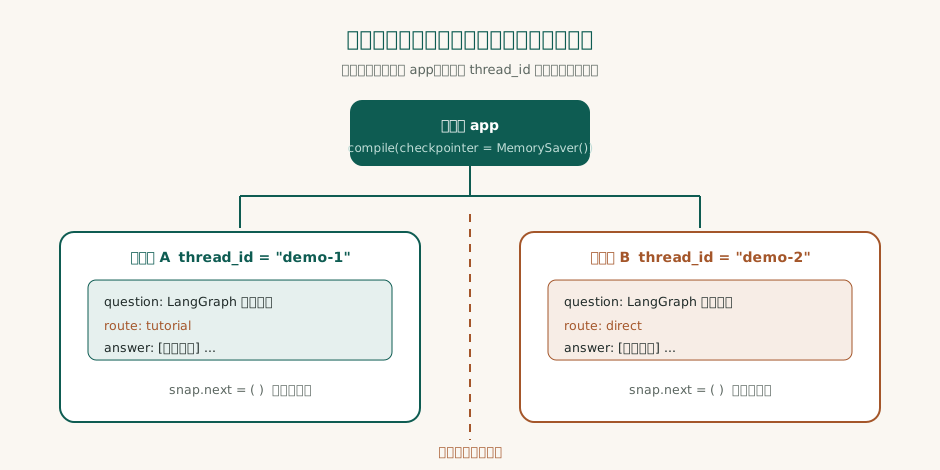
Adding checkpoints only requires changing two lines:
from langgraph.checkpoint.memory import MemorySaver

app = g.compile(checkpointer=MemorySaver())
cfg = {"configurable": {"thread_id": "demo-1"}}

app.invoke({"question": "How do I use LangGraph?"}, cfg)
snap = app.get_state(cfg)

print(snap.values)   # complete saved state
print(snap.next)     # next node to be executed
Actual output:
{'question': 'How to use LangGraph?', 'route': 'tutorial', 'answer': '[Tutorial path] Produce step-by-step instructions for "How to use LangGraph?"'}
()
Here are two questions beginners often ask.
Question 1: Why is snap.next empty?
Because the flow has already finished running. next represents "the next node that has not yet been executed"; once it has finished running, it is naturally empty. If the graph stops in the middle (for example, while waiting for human approval), this will list the nodes pending execution, and you can then push it forward to continue running. This is what "resumable" looks like in concrete terms.
Question 2: What is thread_id?
Think of it as a save slot. The same app can serve multiple conversations at the same time; as long as different thread_id values are provided, the states remain independent and do not contaminate each other. In actual testing, running different questions with demo-1 and demo-2 respectively produced route values of tutorial for one and direct for the other, without interfering with each other.
Incidentally, MemorySaver stores state in memory, which is suitable for development and testing. In production, you need to switch to a database-backed checkpoint; otherwise, everything is forgotten when the service restarts.
⚠️ A small pitfall I hit during actual testing:
get_state()returns a NamedTuple, so you must access values withsnap.values, notsnap['values']. The latter directly throws aTypeError. I got stuck on this for a moment back then.
6. When Not to Use LangGraph
This is the part many tutorials skip, but it is actually very important: The idea that adding a graph will make things better is wrong.
In the following cases, using a Chain or a single call is more cost-effective:
- The flow is a straight line, with no branches and no retries
- There are only one or two steps, and adding a graph layer is just unnecessary abstraction
- The team is not yet familiar with state management, and forcing in a graph will make debugging harder
- What you want is simple "question answering", not a "flow"
The criterion is just one sentence: Ask yourself, "Does this flow need to go back, or stop midway?"
If yes, it is worth using a graph. If no, do not add one.
7. For Those New to This: Three Common Misconceptions
Misconception 1: Thinking LangGraph is a "stronger Chain".
It is not. It is a way to express control flow. Chain describes "sequence", while Graph describes "relationships". These two things are not the same.
Misconception 2: Thinking it must be paired with an LLM.
It does not. The example in this article does not call a model at all. A graph is just the skeleton of a flow, and a model is one kind of component placed inside a node.
Misconception 3: Thinking nodes can pass values directly to each other.
They cannot, and they should not. All data goes through the whiteboard. This convention may seem verbose, but it is exactly the precondition for "each step can be tested independently".
8. Three Sentences to Take Away
- The value of LangGraph is not in being a "stronger Chain", but in making control flow explicit: branches, loops, and interrupts all become visible on the graph.
- Nodes only return increments, and the framework merges the state. This convention makes complex flows amenable to reasoning.
- Checkpoints are the foundation of recoverability, and they are also the most easily underestimated threshold between prototype and production.
下一步
If you want to continue further, you can first fill in the framework-layer basics (LangChain Complete Guide 2026), then see how tools connect into an Agent (MCP Ecosystem Explained), and finally wrap up from an architectural perspective (Three-Layer Agent Collaboration Framework).
Example code test environment: Python 3.9.6, langgraph 0.6.11, langchain-core 0.3.86.
More in Learn
- Agent Interfaces: choosing between CLI, API, browser use, computer use, and sandboxes
- Build Your First AI Agent in Seven Steps: from environment to a minimal production pass
- After You Press Enter: From 0.03 s to 0.85 s, What Your Question Goes Through
- The AI Coding Tools Map: Recognize the Form Factor First, Memorize Names Later